
LPG POS features
What LPG POS does and why it matters in a gas shop, in plain language. It is free to start, and Pro (from Rs 250 a month) adds cloud sync, the web app and unlimited customers. See the plans.
In the app
Real screens, real shop
A gas shop's day: a sale with add-ons, the bill, the daily sheet and a customer's credit.
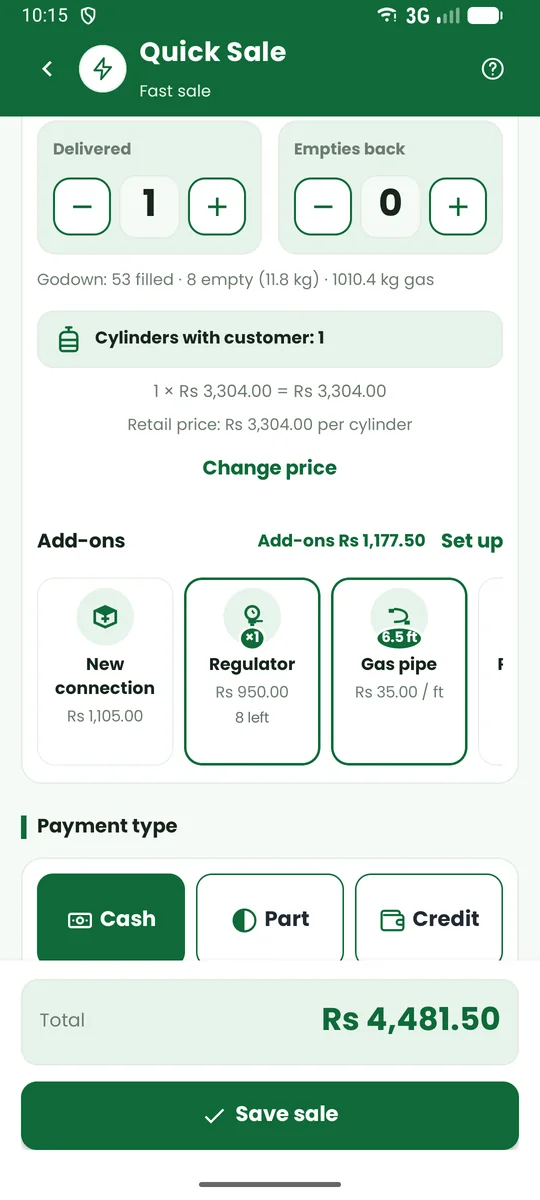
Sale with add-ons
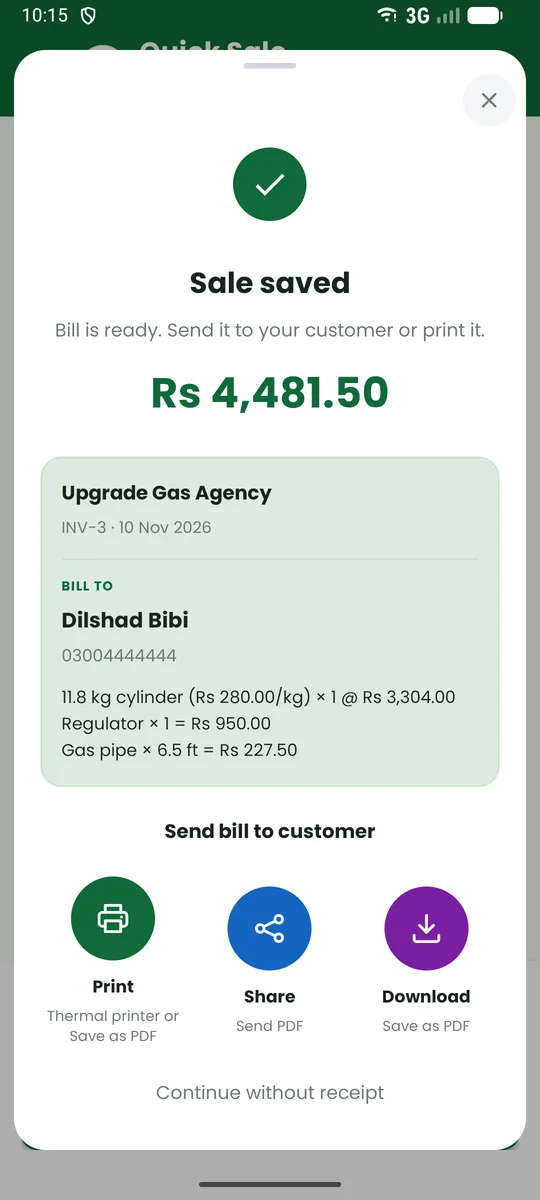
The bill
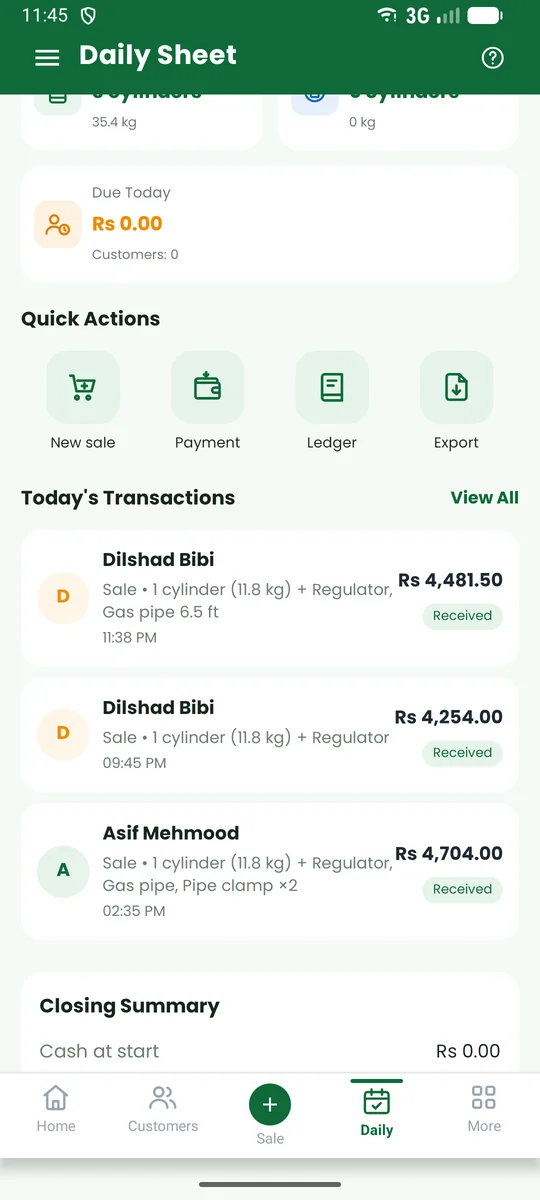
The daily sheet
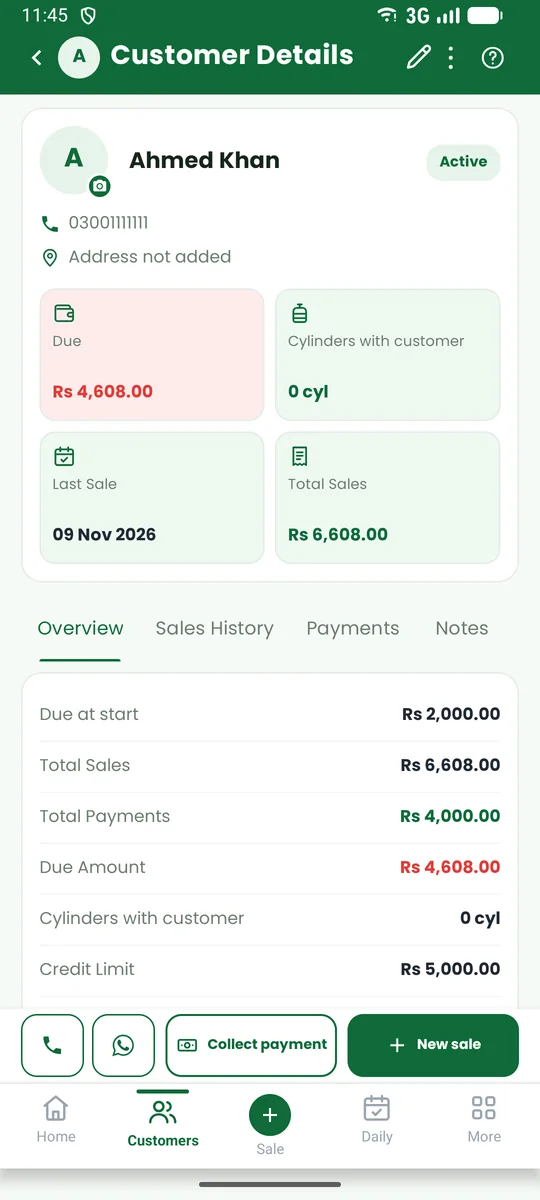
Customer credit
Sell and collect
Quick sale
Record a sale in a few taps. Choose cash, card or credit, then print or share the receipt. A busy counter stays fast, and every sale goes into the daily sheet for you.
Filled and empty cylinders
Each sale records the filled cylinders you hand over and the empties that come back. You can see who holds how many of your cylinders, the number gas shops lose track of most.
Customer credit ledger
See who owes what, record part payments and advances, and share a customer statement on WhatsApp. Credit stays clear, so you can ask for money with a record in hand.
Collections and reminders
A collections list shows who to ask first. Reminders (Pro) are prepared for you, but nothing is ever sent unless you tap send.
Refill by kg
Sell gas by weight into the customer's own cylinder, from an opened cylinder of the size you choose. Stock moves by the cylinders opened and used up, profit counts the kilograms drawn, and gas left over in an empty cylinder is booked as gas lost.
Add-ons with the gas
Sell the regulator, pipe, clamp or stove with the cylinder in one tap, by the piece, foot, metre or kg. A New connection button puts them all on the bill. Every add-on shows on the invoice, slip and daily sheet, with its stock and profit.
Order link and payment QR
Share an order status link so a customer can see where their order stands. Add a payment QR to your documents so paying is easy. The payment QR is part of Pro.
Stock and suppliers
Stock and low-stock warnings
Filled and empty stock, and the stock you receive from suppliers, are always up to date. A warning tells you when to reorder, before a customer is turned away.
Cylinder count
Every cylinder you own, size by size: full or empty in the shop, with customers or at the supplier. Customers' own cylinders and other companies' empties are kept apart from your stock.
Physical stock check
Count the cylinders in your godown and compare them with the app. Any difference is recorded as a loss, separate from profit, so your profit figure stays honest.
Customers from your contacts
Add one customer or supplier from your phone contacts, or tick many at once. Name, numbers, address and photo come across. A customer needs only a name.
Suppliers and expenses
Record what you bought, what you paid and what you still owe each supplier, together with your running expenses. Give a delivery a pay-by date and see what is due and what is late.
Money and reports
Daily sheet
See the cash in your drawer, the day's sales and expenses, and close the day so every day is finished and clear. A closed day keeps its figures.
Profit and loss, PDF and Excel
Profit worked out first in, first out: on each bill, on Day close and for any period. Export reports to PDF or Excel for your accountant or your own records.
What your business is worth
Stock at cost, money customers owe you and your cash, less what you owe suppliers. Rates per size show your last buying rate, selling price and margin.
Where your money is
The cash drawer, bank and mobile wallets with their balances. Pick the account each payment went into, with its transaction ID, and keep each supplier's bank details. Move money between accounts, and note money you took out or put in, so it is never mistaken for a shortage.
Deposits and tax
The New connection deposit per cylinder size, printed on the bill and given back if the bill is cancelled. Prices with tax included, your tax number on the bill, and tax paid recorded from an account, never as an expense.
The books
Money in and out by month, what you have and what you owe, and a record of who changed a sale, payment or expense, and when.
Team and several shops
Team
Helpers such as drivers or counter staff can use a limited view. You keep control of sensitive figures.
Linked shops
If you run several outlets, see combined totals without exposing each shop's customers. This is part of the Business plan.
Simple and safe
Works offline
Your entries are saved on the phone, so a weak signal never stops a sale. On Pro they also sync to your other phones and the web app when the connection returns.
Backup and restore
Back up and restore your data. Add an optional password to protect backup files with strong encryption.
Practice shop
A separate demo shop with sample data to learn in. It is kept completely apart from your real shop, so nothing you try there can touch it.
A clearer Home screen
A headline, a strip of key figures and simple pictures. If you prefer the old look, the Classic Home is still available.
Your logo and photos
Your shop logo on invoices, statements and slips, and photos for customers, suppliers, sizes and add-ons.
Your language
English, Urdu (shown right to left), Hindi, Bangla, Spanish, Filipino and Swahili in the app. The ID field uses your country's name, such as CNIC, Aadhaar or NID.
See it for yourself
Free to start. Install LPG POS on Android or open the web app, and read the user manual for step-by-step help.
Questions? Talk to the team
